i found the biggest problem to face with actual all my projects is not necessarily that i lack the idea of what i want to do, but that i lack documentation on how to do it and then go and have to figure out myself. would that be nice if someone had just mounted a page like.. malware reverser's frequently asked questions, arrrr well never happened.
now im not going to start a FAQ page, but in order to help that situation i produced detailed documentation of my latest reversing project
if you read this because you want to know about malware you will be a bit disappointed probably. mainly because the purpose of that malware itself is not so exciting at all. it just downloads.. stuff. but also because i myself focused not directly on the final executable but on the stony path it takes to get there. it is just awkwardly fascinating to watch malware shift bytes around in memory and trying to escape. i would recommend everyone just slightly interested to try it out himself, the according sample hashes for identification are listed in the write up doc.
for the records, the malware is detected as TrojanDownloader.Win32.Upatre, the full report can be downloaded at https://drive.google.com/file/d/0B9Mrr-en8FX4MS1HdjBjNEhYWk0/edit?usp=sharing, on a summary i will try now here. could get dirty though.
FUNCTIONALITY
the analyzed sample is a malicious downloader with the sole purpose to connect to a remote C&C when invoked and to download and execute
additional malware. it communicates via HTTPS to one of two hardcoded domains,
which are believed to be legitimate websites on compromised web servers. malware
execution can be parted in a protection layer, an unpacking layer with
different stages and the final payload. For an initial infection the malware
just copies its own image to the systems %TEMP% directory and executes that
copy.
PROTECTION LAYER
the malware possesses a neat collection of anti-analysis tricks, none of them highly-sophisticated but very nice for learning purposes.
anti-simulation
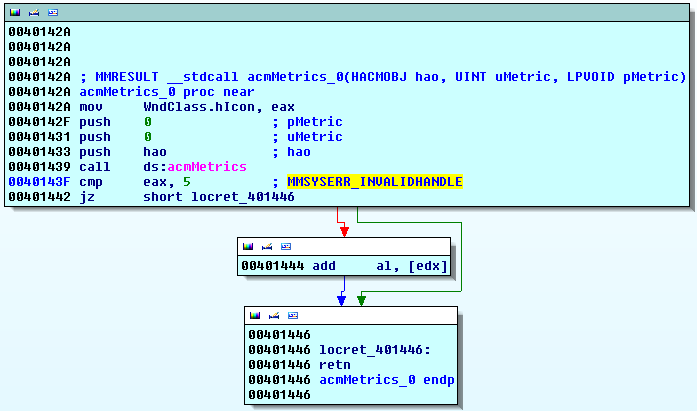 the first one is an anti-simulation trick targetting anti-virus simulation engines by the use of a multimedia API as seen in the picture. acmMetrics
is an API call present in the msacm32.dll library. usually it is used for
retrieving metrics for ACM objects (Audio Compression Manager). during the
startup procedure of a malware sample it is highly likely that this was not the
initial intention when placing that call. acmMetrics is part of the multimedia
library since at least Microsoft Windows 2000 (according to Microsoft
documentation) and in this special case called to trick AV simulation engines.
the first one is an anti-simulation trick targetting anti-virus simulation engines by the use of a multimedia API as seen in the picture. acmMetrics
is an API call present in the msacm32.dll library. usually it is used for
retrieving metrics for ACM objects (Audio Compression Manager). during the
startup procedure of a malware sample it is highly likely that this was not the
initial intention when placing that call. acmMetrics is part of the multimedia
library since at least Microsoft Windows 2000 (according to Microsoft
documentation) and in this special case called to trick AV simulation engines.
in our case acmMetrics is expected to deliver an error message for an invalid handle,
which is not surprising given that the handle parameter is not initialized
beforehand. in case the return value is not MMSYSERR_INVALIDHANDLE, code 5,
execution continues to access the memory referenced by edx, which at this point
always results in a memory access violation. edx is not initialized thus set to
zero.
the point of this check is, on a normal
operating system like Windows 2000 or newer this function returns 5 in any
case. Simulator engines usually don’t support media APIs due to overhead,
therefor either crash on the call or later on the access violation.
implicit breakpoint detection
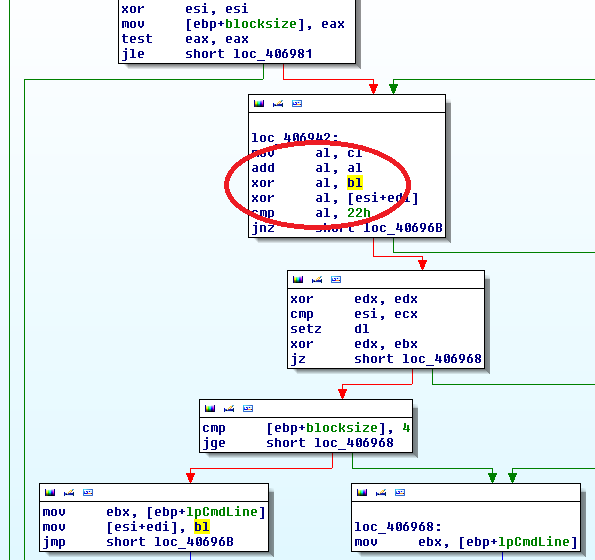
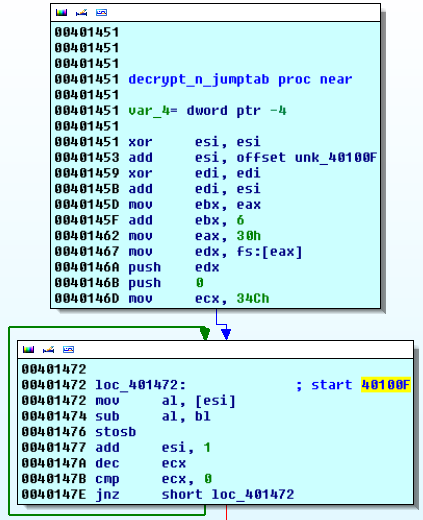 the
protection layer performs minor decryption of a part of its own code, which results
in implicit breakpoint detection. the decryption consists in subtracting a key
from every opcode of a given section. the simple
decryption routine iterates code on the position 40100Fh, where execution
continues later on. If a software breakpoint is placed in the section to be
decrypted the routine produces invalid opcodes and the malware crashes later
on.
the
protection layer performs minor decryption of a part of its own code, which results
in implicit breakpoint detection. the decryption consists in subtracting a key
from every opcode of a given section. the simple
decryption routine iterates code on the position 40100Fh, where execution
continues later on. If a software breakpoint is placed in the section to be
decrypted the routine produces invalid opcodes and the malware crashes later
on.
window confusion
At
the end of what could be classified as protection layer stage one the malware
invokes CreateWindowExA with a provided WndClass Structure. This structure
defines the handler function of the dummy window, which will execute the second
part of the protection layer. The created window has no graphical
representation, thus can’t be seen so just only serves for executing said
handler function. If the analyst does not recognize the switch of execution to
the handler function and places according breakpoints control of the debugger
will be lost.
broken timing defence
 interesting
in the next section of the protection layer is a rdtsc-triggered timing
defense. malware can utilize the system time to verify if a debugger,
including a human
analyst, is attached to the running process. windows offers various
mechanisms
to request the system time, most commonly used are rdtsc or the
GetTickCount
system call. for detecting an attached
debugger/human malware wants to know the time difference between two time
stamps, namely if the delta is too big as if the CPU would execute without
interruption.
interesting
in the next section of the protection layer is a rdtsc-triggered timing
defense. malware can utilize the system time to verify if a debugger,
including a human
analyst, is attached to the running process. windows offers various
mechanisms
to request the system time, most commonly used are rdtsc or the
GetTickCount
system call. for detecting an attached
debugger/human malware wants to know the time difference between two time
stamps, namely if the delta is too big as if the CPU would execute without
interruption.
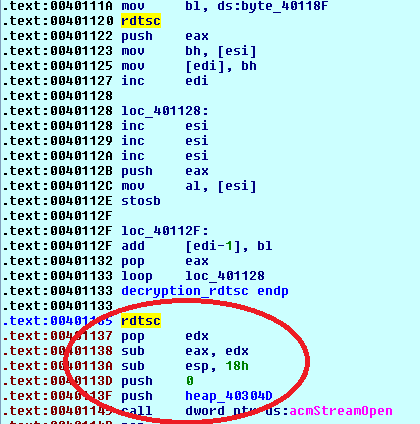
the malware
at hand issues two rdtsc instructions, wrapped around the decryption loop. the
delta is calculated immediately afterwards, but never checked against any threshold. instead it is kept in eax until the next system call
overwrites it with its return value. no other verification could be found, this
anti-debugging trick is either broken or the first timestamp servers a
different purpose that could not be identified.
more multimedia disturbance
the windows
media library is used a second time as a means of protection from analysis. the
malware issues a call to mciSendStringA with the command “set waveaudio door
open”. it is not perfectly clear what purpose the
command “set waveaudio door open” usually fulfills, but without doubt the aim
of the malware at hand is not to interfere with multimedia devices. an effect
of mciSendStringA is that it starts up two additional threads for interaction
with devices – the analyst could lose control of the debugger when
inappropriately configured. a solution is to configure the debugger to stop on
the start-up of a new thread, step back to the original code and continue
execution until it returns to the malware code.
UNPACKING LAYER
after bypassing all the protection mechanisms the unpacker executes without problems. unpacking can be parted in three steps:
- one that compresses and decrypts the packed payload data
- second one that decompresses the same data using RtlDecompressBuffer
- third one which performs checks on the unpacked binary, patches function call offsets and reconstructs the import address table (IAT).
details on the unpacking routine, including the IAT reconstruction, can be found in the report mentioned above. any critics on that analysis are welcome :) ou.. how did that sample actually catch my attention? it was part of a mean malware spam wave, that has been ongoing in austria for at least since november. samples are all the same size and have very similar protection/unpacking mechanisms. so some future research would be to look at the other ~100 related malwares that i have and correlate similarities on binary level. maybe..
future shines bright, you know?